

Reminders
When an invoice is overdue, you remind your customer in up to three levels: payment reminder, first reminder and final reminder. Folnaro suggests the next level and charges fees and default interest only where they are allowed. Each letter is created as a PDF with its own number. You send it by email or post.
The reminder levels
| Level | When | Tone |
|---|---|---|
| Payment reminder | A few days after the due date | Friendly, without fee or interest |
| First reminder | After the reminder’s deadline has passed | Firm, with fee and default interest if you set them |
| Final reminder | After the first reminder’s deadline has passed | With the notice that further steps follow |
Each letter gets a number from the Reminders number range and a New deadline. In German the texts address the customer formally, or informally if you set that for the customer. After the final reminder the next step is a court dunning procedure outside the app.
Set deadlines, fees and interest
- Choose Folnaro > Settings… > Reminders.
- For each level, set how many days After due date or After previous deadline it is due, which Fee it carries and whether to Charge default interest.
- Under Letter, set the New payment deadline in days that appears on every letter.
- Turn on Charge businesses a 40 € lump sum if you want to claim it. It is added once, to the first reminder, and never for consumers.
Out of the box Folnaro reminds 7 days after the due date without a fee. The first reminder follows 14 days after the deadline with €2.50 and interest, the final reminder another 14 days later with €5.00 and interest. The new deadline is 10 days.
For a fee above €5, Folnaro points out that only the cost of the letter is allowed. You can’t enter more than €100.00. Under Default interest today you see the current Base rate and the rate for Consumers and Businesses. The Deutsche Bundesbank publishes the base rate on January 1 and July 1. Folnaro includes the published rates. If a newer one is missing, add it under Base rate history with Valid from and Rate in %.
Remind one invoice
- Select an overdue invoice and choose Document > Create Reminder…. The inspector offers the same action in the Reminders section.
- Check the suggested Level. If you choose a later one, Folnaro says which one you skip.
- Check the breakdown: Open amount, Reminder fees, default interest with rate and days, Total due, New deadline and In default since.
- If needed, write your own text under Own text (optional). It appears in the letter above the breakdown. If the field stays empty, the letter uses the level’s standard text.
- Click Create and Send… to prepare the email right away, or Create Only if you send it by post.
What Folnaro checks for you
- Default: If your customer is not in default yet, only this letter puts them in default. Folnaro then charges no fees and no interest and says so. It leaves out fees of earlier letters sent before default. Every earlier letter your customer received after the due date puts them in default, whatever its level. This also applies when you create a letter of the same level again. Default interest runs from the following day, and the new letter refers to the earlier reminder.
- Deadlines: If the level is only due later according to your settings, Folnaro names the date. You can still create it now. When reminding several invoices, an invoice stays out while the last reminder’s deadline is running.
- Limitation: The three years start at the end of the year in which the claim arose, for an invoice usually at the end of the year it fell due (§§ 195 and 199 (1) BGB). Once they have run out, Folnaro warns with Possibly time-barred. Check this before you send a reminder.
- Never sent: If the invoice was never sent, Folnaro suggests sending it first or attaching it to the reminder.
- Lump sum: The €40 lump sum is counted against legal costs, reminder fees included. The customer therefore owes only the larger amount, never both together.
- Outdated letters: Folnaro no longer sends a reminder whose deadline has passed, that a newer level replaced or whose invoice has been settled since, and says why.
Remind several invoices at once
- Choose Invoices in the sidebar.
- Click More > Create Reminders… in the toolbar. Or select invoices and choose Create Reminders… in the context menu.
- Folnaro suggests the next level for each overdue invoice. Invoices whose deadline is still running appear under Not due yet, possibly time-barred ones under Possibly time-barred. Both stay out.
- Deselect the letters you don’t want. At the bottom you see how many letters for which amount will be created.
- If a customer has several invoices at the same reminder level, One letter per customer sends them as one combined reminder: one letter with one number, a table of all invoices, the reminder fee once and default interest per invoice. Turn the option off if each invoice should get its own letter.
- Turn on Send by email right away if each letter should go with its PDF to the invoice’s recipient. This needs an email account in the settings.
- Click Create or Create and Send.
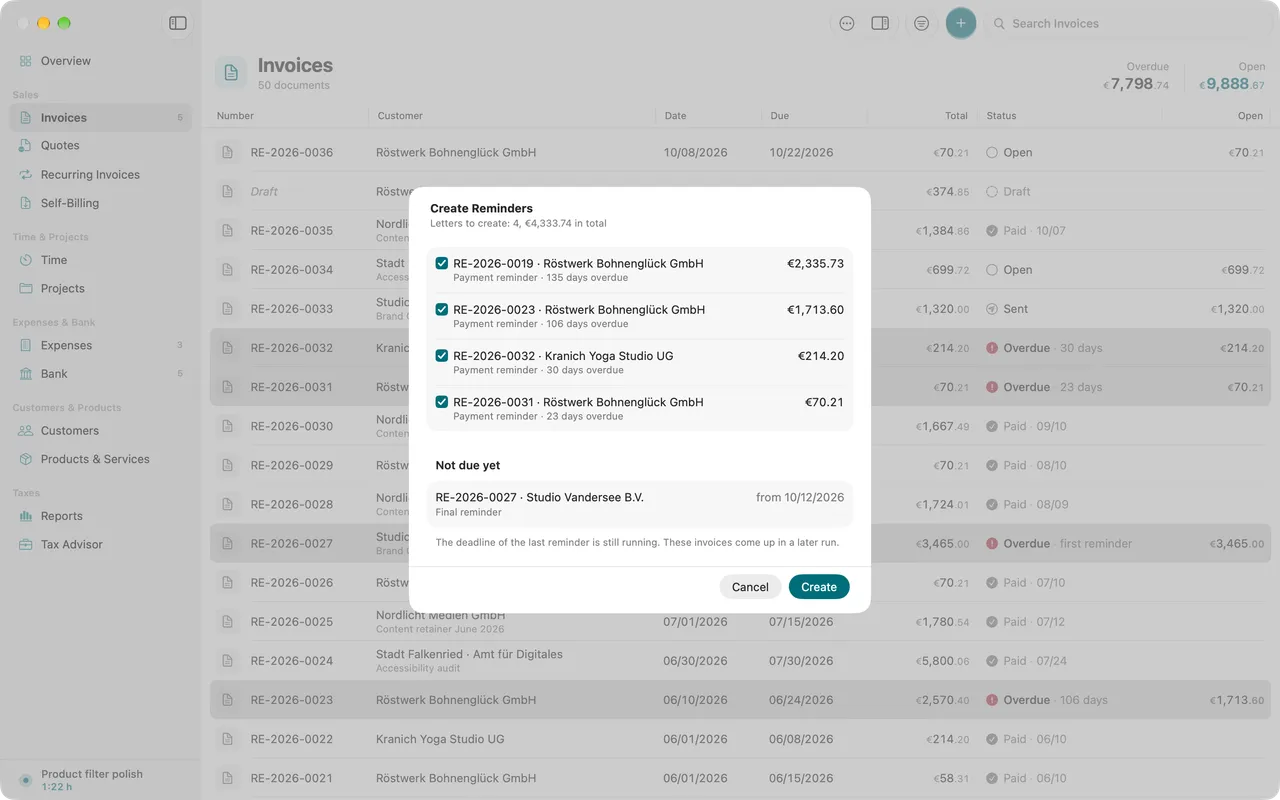
If a letter could not be sent, Folnaro names it at the end. You then send it on its own from its invoice.
Check the history and send letters
In an invoice’s inspector, the Reminders section shows each letter with level, number, date, amount and whether it is Sent or Not sent. A click opens the PDF in Quick Look, right inside Folnaro. A combined reminder appears with the same number in each of its invoices. From the context menu you send a letter by email, or choose Mark as Sent if you sent it by post. This cannot be taken back.
In the invoice list a reminded invoice shows the level instead of the days, such as “Overdue · first reminder”. The Reminded filter shows every reminded invoice.
The reminder email
Each level has its own email template: payment reminder, first reminder and final reminder, each in German and English, formal and informal. You adjust them under Folnaro > Settings… > Email Templates. The letter’s PDF is attached to the email. More under Sending documents by email.
After the final reminder
If the customer still doesn’t pay after the final reminder, what remains is the court dunning procedure, which you apply for online at the dunning court. If the money is lost for good, for example after an insolvency, write off the receivable (see Payments, refunds and write-offs). If the money arrives after all, record the payment as usual. The reminders stay in the history.
Common problems
- Create Reminder… is dimmed.
- The invoice is not overdue yet, already paid or already at the final level. Check the due date in the inspector.
- The reminder contains no fee and no interest.
- Your customer was not in default yet; only this letter puts them in default. Or the level has no fee and no interest in the settings. Check Folnaro > Settings… > Reminders.
- An invoice is missing from the batch.
- The last reminder’s deadline is still running, the claim is possibly time-barred, or the invoice is already at the final level. You can still create a single reminder from the invoice.
- Sending right away doesn’t work.
- No email account is set up. Set one up under Folnaro > Settings… > Email, or create the letters and send them one by one.
- An older reminder can no longer be sent.
- Its deadline has passed or a newer level replaced it. Create the next level or send the newer one.