Invoices, time and receipts. Clear at a glance.

Folnaro is the bookkeeping app for freelancers and small businesses in Germany. From the quote to the package for your tax advisor, built as a real Mac app.

Coming soon to the Mac App Store All features

Free for 30 days. Then subscribe or buy once.

  • No subscription needed
  • No account required
  • Your data on your Mac
A cosy study with FolnaroSomeone writes an invoice on a Mac. The invoice comes out of the screen, gets its number when it is finalized and flies out of the window as a paper plane. Then it is paid, and the person jumps up and celebrates. A cat sleeps on the rug.1:24:36RE-2026-0042Paid

Everything that comes back every month, in one calm place.

Write quotes, track hours, collect receipts, match payments, hand over the quarter. Folnaro takes the repetition off your hands and follows German tax rules while it does.
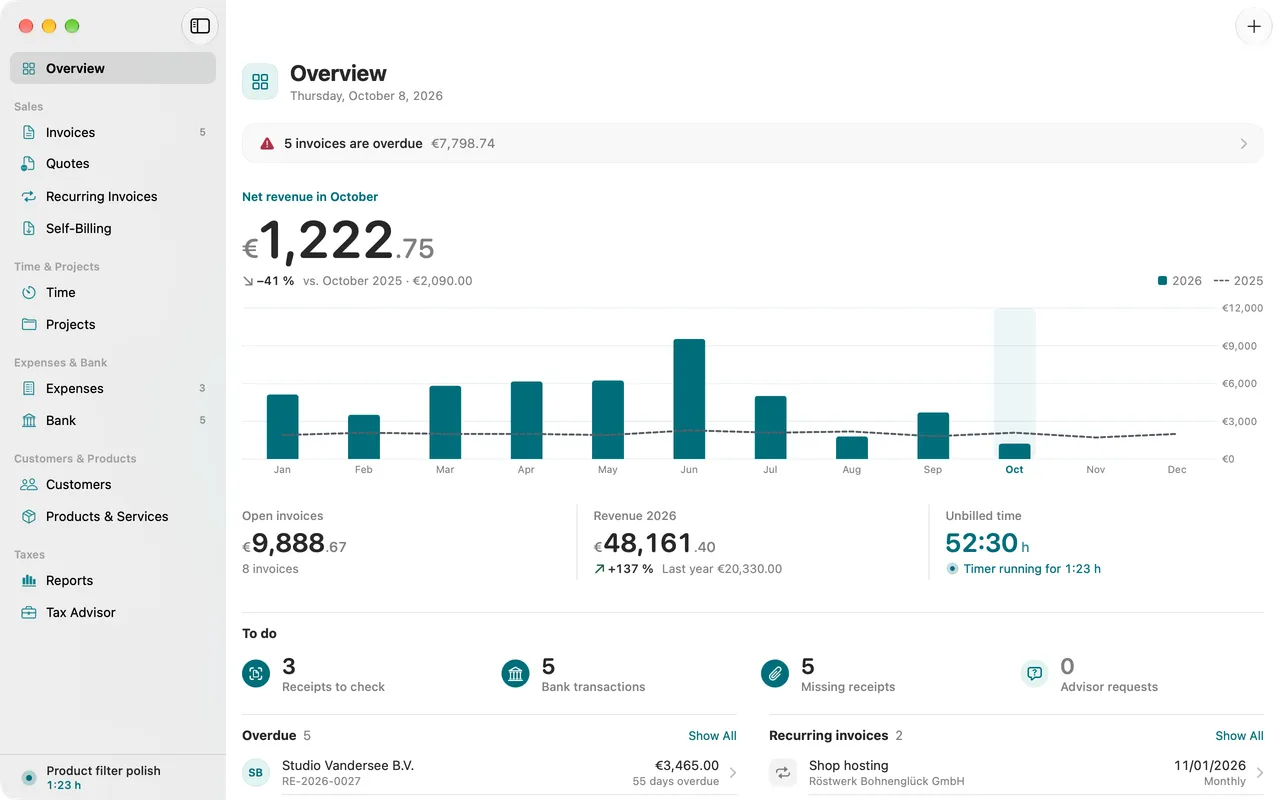
Folnaro overview with open amounts, revenue of the month, upcoming deadlines and a running timer in the sidebar.

One month

What a month feels like.

Four moments that come back every month. Folnaro takes the repetition off your hands.

  1. 01 Week 1

    The quote becomes the invoiceAn accepted quote turns into an invoice with one click.

    The quote goes out

    The lines come from your products. When the customer agrees, the quote becomes the invoice.

    Quotes
  2. 02 Weeks 2 and 3

    Time keeps runningA stopwatch runs, the bars of the week grow and the hours count up.

    The hours keep running

    The timer sits in the menu bar. In the evening the time is on the right project.

    Time tracking
  3. 03 Week 4

    An invoice is finalizedAn invoice fills with line items, gets its number when it is finalized and is marked as paid.

    The invoice goes out

    Your unbilled hours become an invoice. Before you finalize, Folnaro names what is still missing.

    Invoices
  4. 04 End of month

    Payments find their receiptsThree bank transactions are matched to their receipts, one after the other.

    The money is in

    You load the bank statement. Folnaro matches the payment to the invoice.

    Bank reconciliation
An invoice is finalizedAn invoice fills with line items, gets its number when it is finalized and is marked as paid.

01 Quotes and invoices

From quote to invoice, no detours.

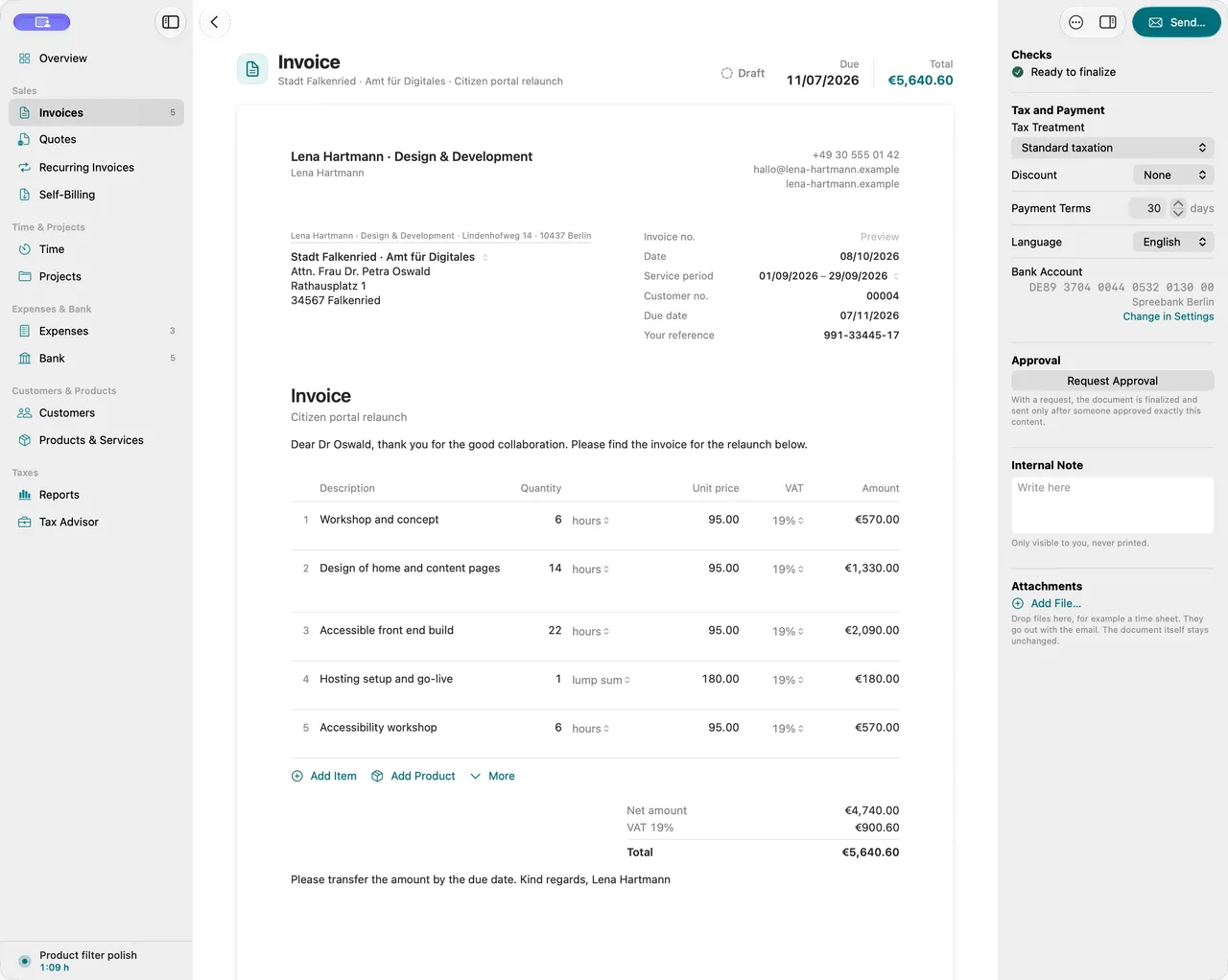
A quote becomes an invoice in one click, a partial invoice later becomes the final invoice. Folnaro does the math, checks the mandatory fields and assigns the number only when you finalize.

You write line items, Folnaro computes net, tax and gross to the cent, per tax rate. The small business rule and reverse charge are built in, with the right notice on the document.

The PDF carries your logo and your colors, not ours. You pick the language per document, and your customers are addressed formally by default.
More about invoices

Numbers
Gap-free and assigned on finalizing. A deleted draft never leaves a gap.
Mandatory fields
Checked under § 14 UStG before finalizing, naming the field that is missing.
Corrections
Finalized means locked. You correct through a cancellation invoice or an invoice correction.
Recurring invoices
Monthly work arrives on time as a draft for you to check.
A new invoice line is typed: title, quantity and price, the totals update live.
Invoice and e-invoiceNext to the invoice sheet, the e-invoice with its structured data appears.

02 E-invoice

XRechnung and ZUGFeRD. Simply included.

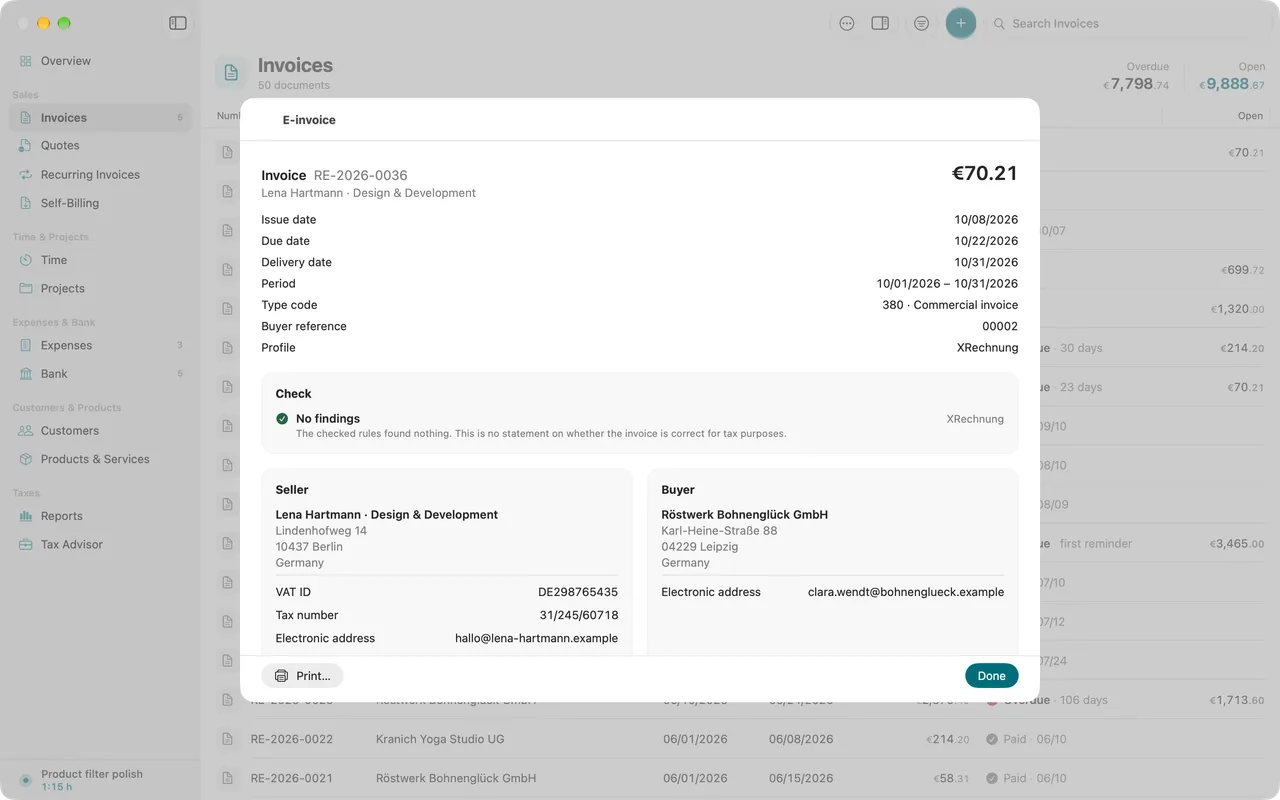
Since 2025 every business in Germany has to be able to receive e-invoices, and sending them follows in stages. Folnaro creates both formats and reads incoming e-invoices, with no add-on and no extra charge.

You write the invoice as always. Whether it leaves as a PDF, an XRechnung or a ZUGFeRD document is a setting on the customer, not an extra step.
More about e-invoicing

Create
XRechnung as XML or ZUGFeRD as a PDF with embedded data, preset per customer.
Public bodies
The buyer reference (Leitweg-ID) lives on the customer and goes into every invoice.
Check
Before finalizing, Folnaro checks the required fields and names what is missing.
Receive
Incoming e-invoices are read, not retyped.
Readable view of a received XRechnung with sender, lines and tax amounts.
Time keeps runningA stopwatch runs, the bars of the week grow and the hours count up.

03 Time tracking

Time keeps running. Even with every window closed.

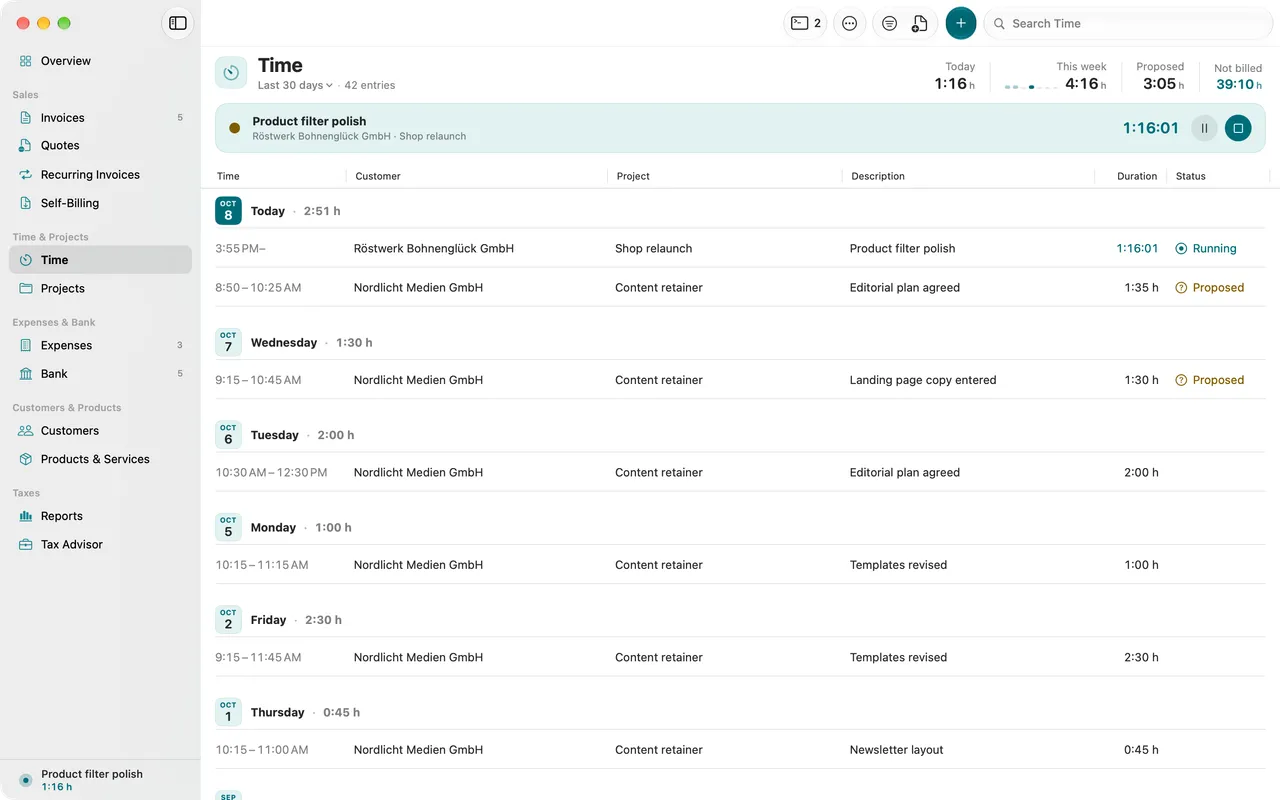
The timer lives in the menu bar and keeps going when all windows are closed. At the end of the month, the hours become an invoice in a few clicks.

Every time entry knows where it stands: open, in draft or billed. Delete the draft and the hours are open again. Nothing is billed twice.
More about time tracking

Menu bar
Start, switch and stop the timer without opening the app.
Week
The week rhythm shows at a glance where your hours went.
Billing
Take the hours of a period into a draft as line items, grouped by project.
Time sheet
Share your time with the customer as a time sheet or attach it to the invoice.
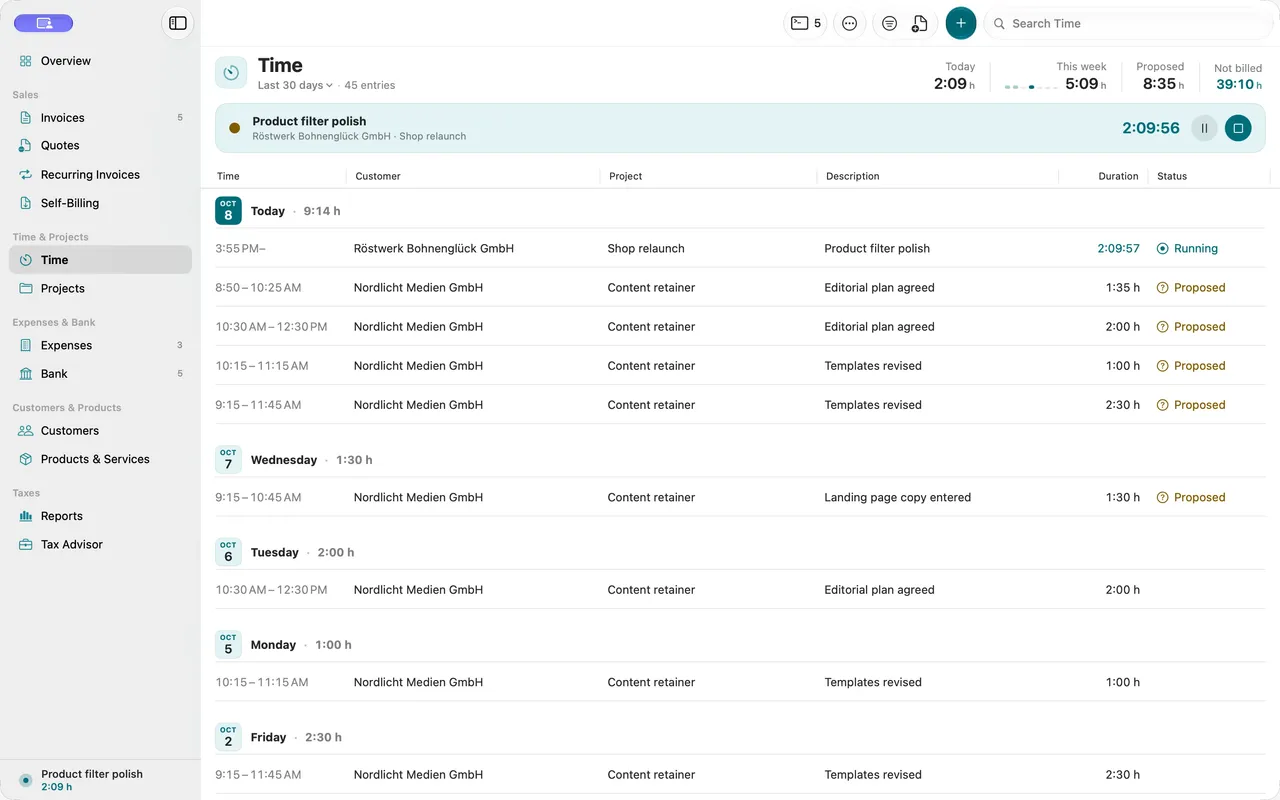
Time tracking with a running entry, entries grouped by day and unbilled hours per project.
A receipt arrivesA receipt drops into the tray and Folnaro reads the amount.

04 Receipts and expenses

Drop in a receipt. Folnaro reads the rest.

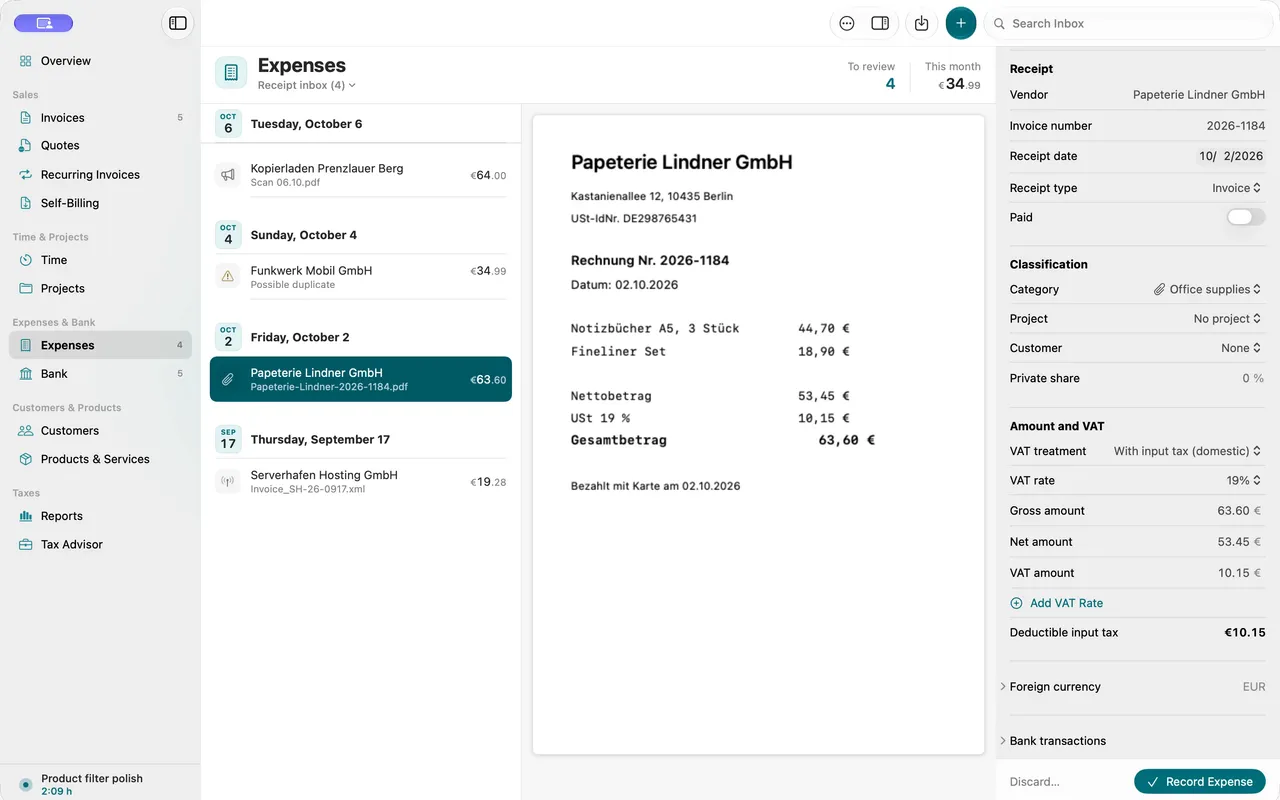
Drag a receipt into the window or share it from another app. Folnaro reads amount, date, tax and vendor right on your Mac. You check, assign and save.

A wrong receipt is not deleted but voided. It stays in the archive and no longer counts, so it remains traceable what happened when.
More about receipts

Recognition
Text recognition on your Mac, no upload. E-invoices are read exactly.
Inbox
Everything new lands in one place and waits until you have checked it.
Categories
Expenses in categories that match the EÜR, with input tax shown separately.
Retention
Receipts stay unchanged in the archive for the statutory periods.
A receipt lands in the inbox and is read automatically.
Payments find their receiptsThree bank transactions are matched to their receipts, one after the other.

05 Bank reconciliation

Every transaction finds its match.

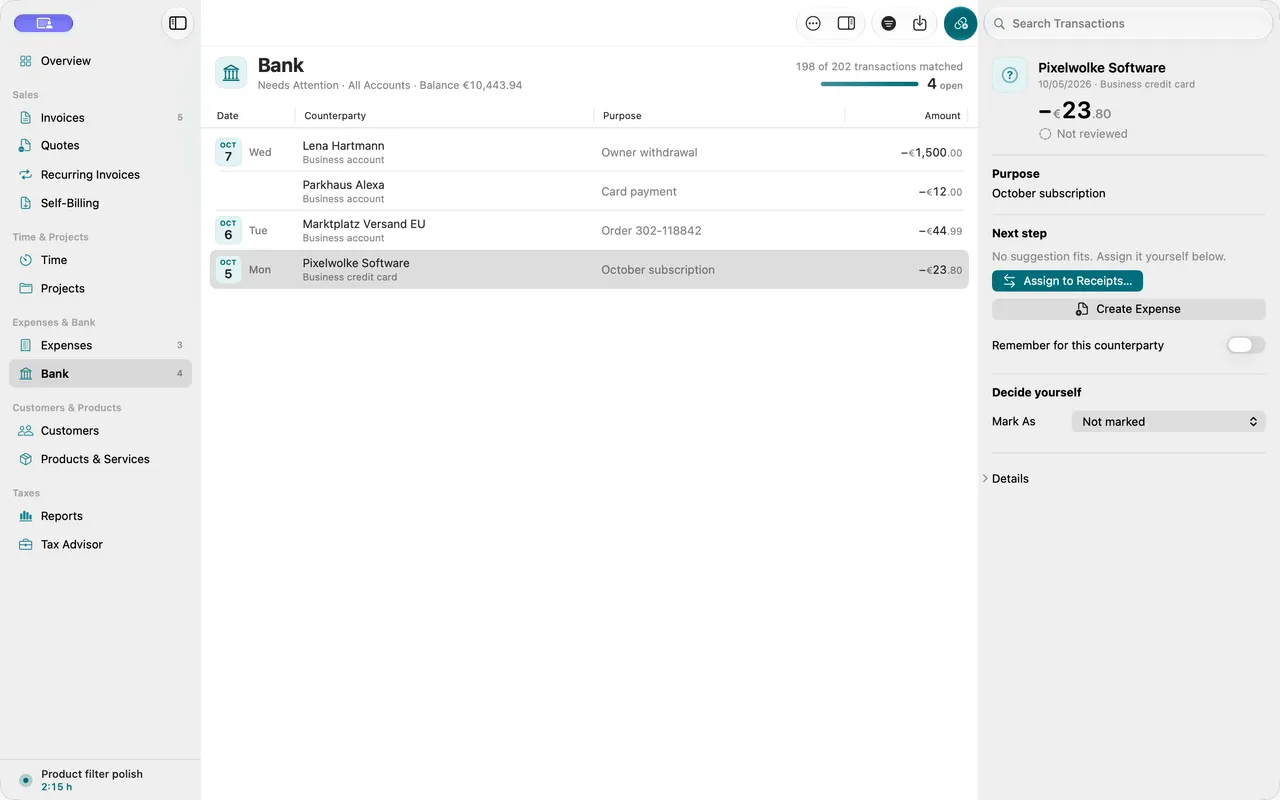
Import your bank statement as CAMT, MT940 or CSV. For every transaction Folnaro suggests the matching invoice or receipt and shows where something is still missing.

Confirm, skip, do it later. Reconciliation is a calm list that gets shorter, not a form.
More about bank reconciliation

Import
CAMT, MT940 or CSV, as your bank offers them for download.
Suggestions
Matching invoices and receipts by amount, date and reference.
Payments
An incoming payment marks the invoice as paid, partial payments included.
Gaps
Transactions without a receipt show up at once, without blame.
An incoming payment is matched with the suggested invoice, which then counts as paid.
The figures for VATThe months grow into bars, the figure for the VAT return counts up.

06 Taxes and reports

The package for your tax advisor. Ready when you are.

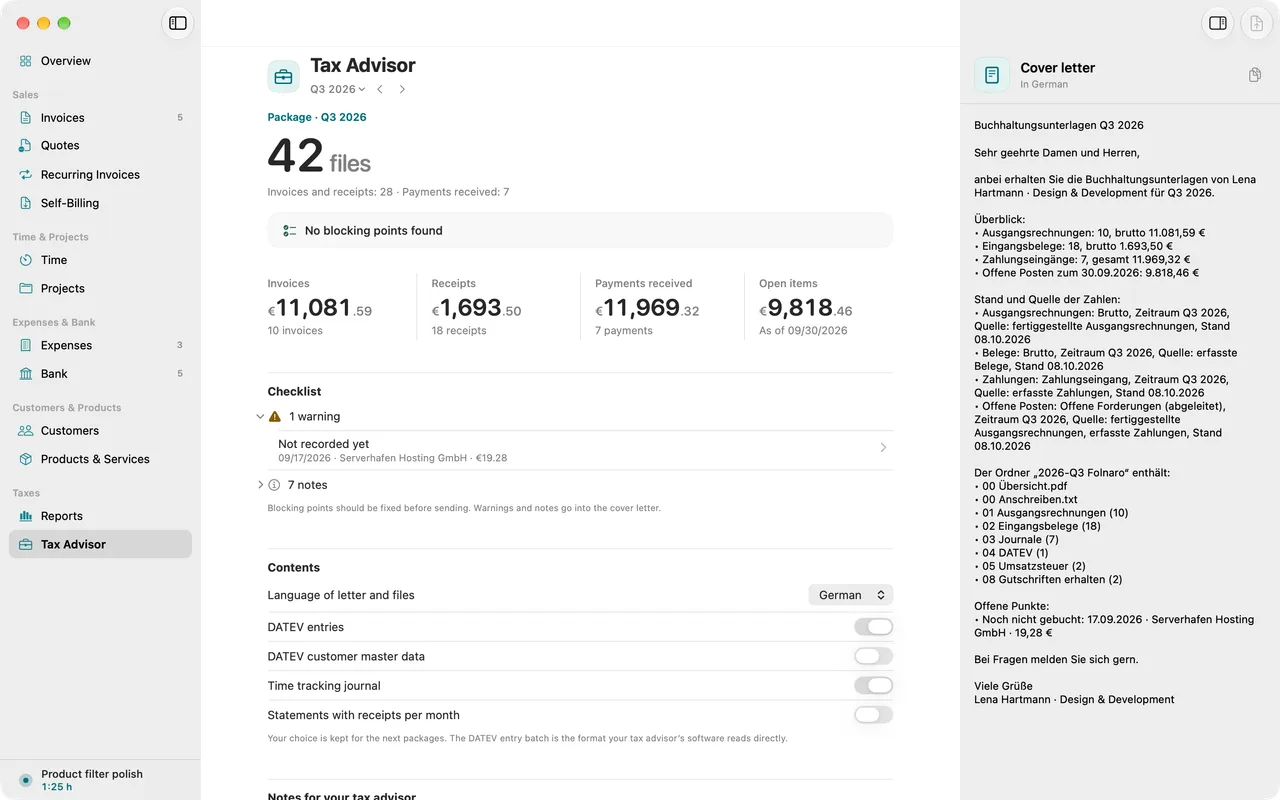
Folnaro computes the figures for the VAT return, the EC sales list and the EÜR from your invoices and receipts and bundles them into a package for your tax advisor.

Every figure traces back to the invoices and receipts it comes from. If something is missing, Folnaro tells you beforehand what.

Folnaro prepares the figures and is no substitute for tax advice.
More about taxes

VAT return
The figures by Kz, monthly or quarterly.
EC sales list
Intra-EU supplies by VAT ID.
EÜR
Income and expenses by category for the whole year.
DATEV
Export in DATEV format that your tax advisor can import directly.
Package
Invoices, receipts, journals and the export in one folder.
Tax advisor package: checking period, receipts and bank transactions before the export.
A friendly reminderA bell rings, three reminder levels are ready.

07 Reminders

Remind kindly. Follow up firmly.

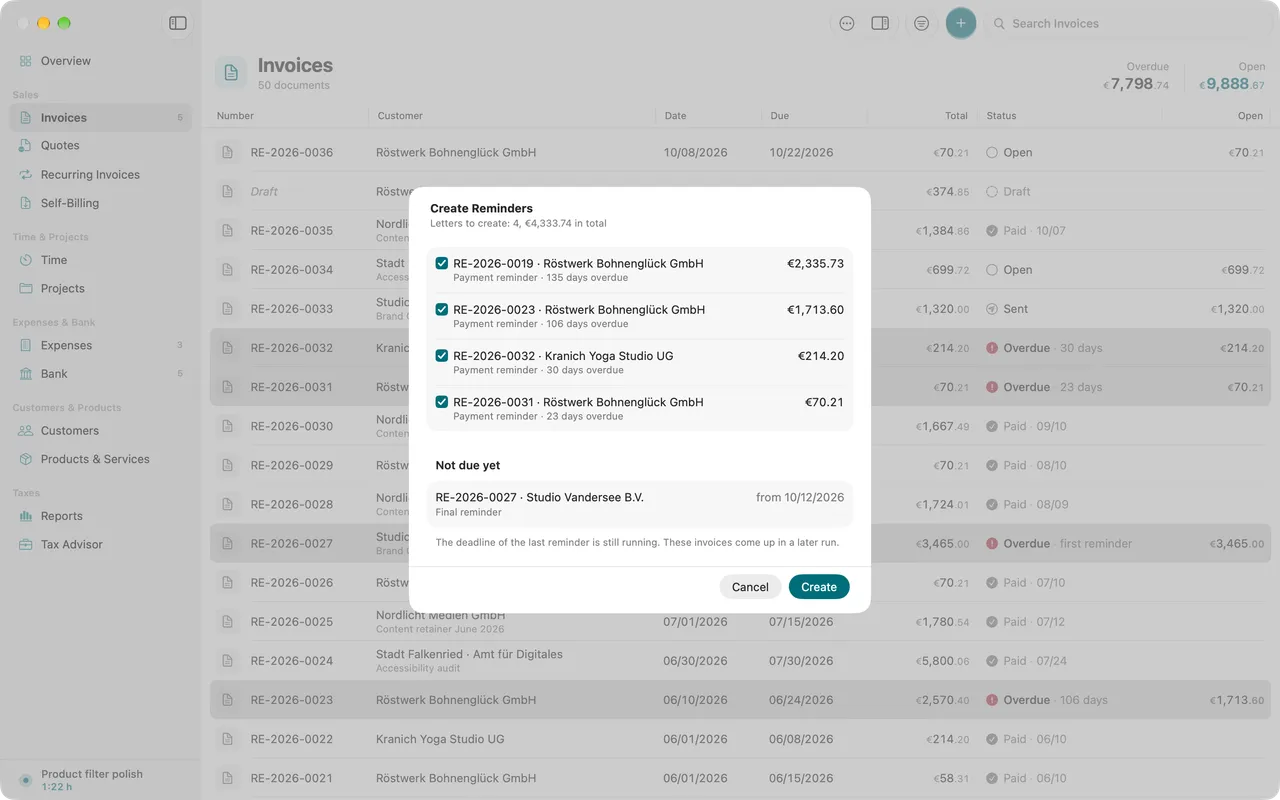
Folnaro shows which invoices are overdue and suggests the right reminder level. You check the text and send it, one at a time or all at once.

The tone is yours. Adjust the template for each level once, and Folnaro writes every reminder with invoice number, amount and deadline.
More about payment reminders

Levels
From the first to the final reminder, each with its own deadline.
Fees and interest
Reminder fees and default interest if you want them, the § 288 BGB lump sum for business customers.
All at once
Reminders for every overdue invoice in one pass.
Limitation
A notice when a claim is time-barred.
Creating reminders for several overdue invoices at once, with dunning level and fee.
An agent works with FolnaroCommands run in the terminal and an invoice draft comes out of it.

08 Agents through MCP

Your agent pitches in. By your rules.

Folnaro ships a local MCP server. Agents like Claude, Codex or Cursor can add customers, write drafts, track time or pull reports.

You say “Write a draft invoice for Atelier Nord for the hours in September.” The agent creates the draft, 32.5 hours, and it waits for you.
More about agents

Local
The server runs on your Mac, with no service in between.
Permissions
You grant write access per area. Reading is where it starts.
Same rules
Agents pass the same checks as the app. Finalizing only with your approval.
Log
Every change an agent makes is in the log.
An agent records working time through MCP, and it appears in Folnaro right away.
A real Mac appA Mac with menu bar, timer and widget, a mug next to it.

09 A real Mac app

Feels like the apps you already love.

No browser window and no web interface. Folnaro is built with SwiftUI for the current macOS and does what a Mac app should do.

If you like, Folnaro starts at login and stays in the menu bar when all windows are closed. Your work waits where you left it.
More about Folnaro on the Mac

Everywhere
Menu bar, widgets, Shortcuts and Spotlight.
As you expect
Quick Look, print, share, drag and drop and undo.
Fast
One field for search, commands and quick entry, keyboard shortcuts for everything important.
Secure
Lock with Touch ID, credentials in the keychain.
Light and dark
Dark mode and increased contrast, each designed with care.
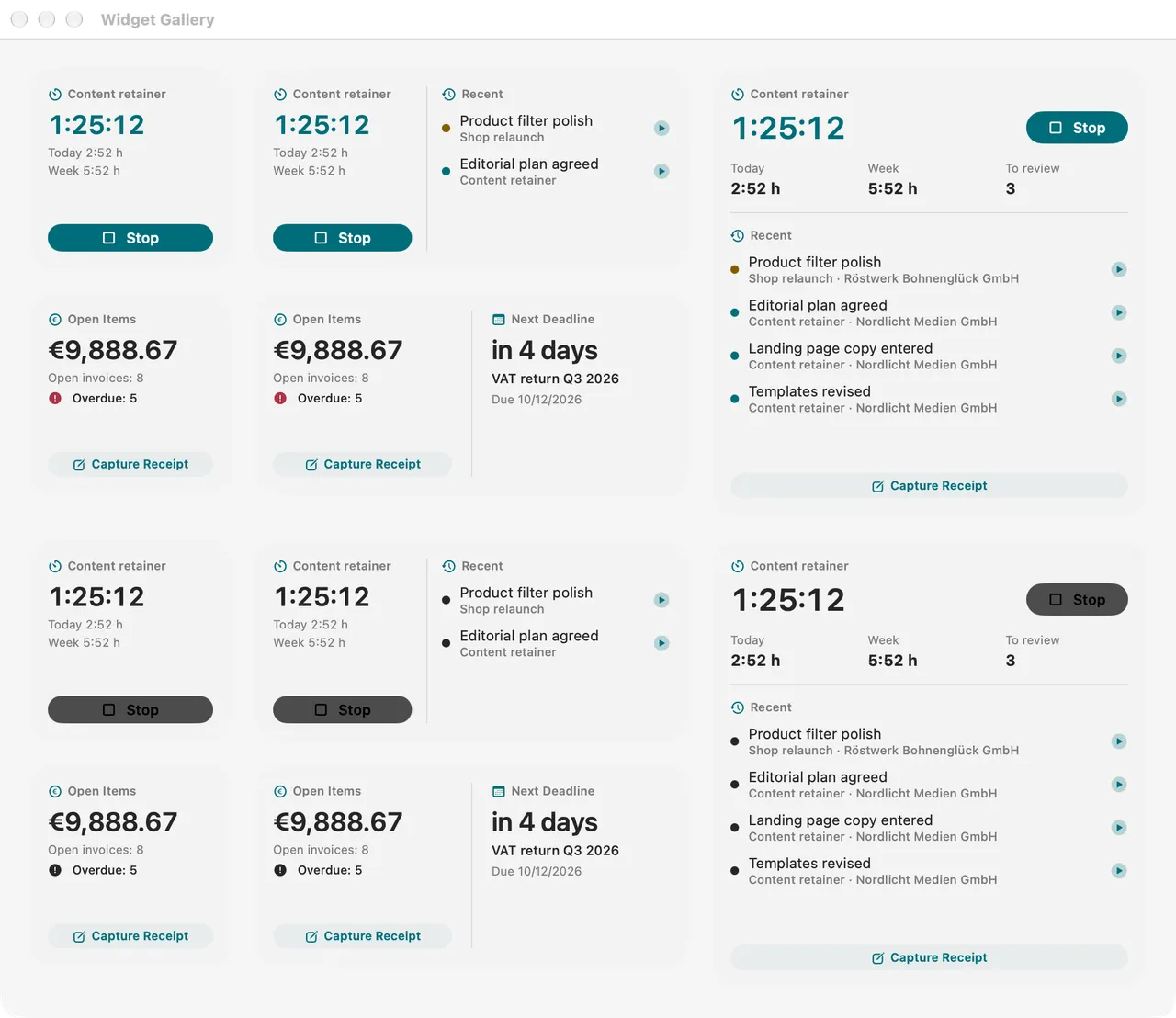
Folnaro widgets with a running timer, open amounts and upcoming deadlines.
Your data stays with youA sheet arrives at the vault and the handwheel turns to lock the door.

10 Privacy and sync

Your data stays on your Mac.

Folnaro has no user account and no server for your data. Invoices, receipts and time live in a database on your Mac. We see none of it.

We only receive what you send us yourself, such as a message to support. This website works the same way: no cookies, no measuring, nothing from other servers.
More about your data

No account
No sign-in, no analytics, no ads.
iCloud
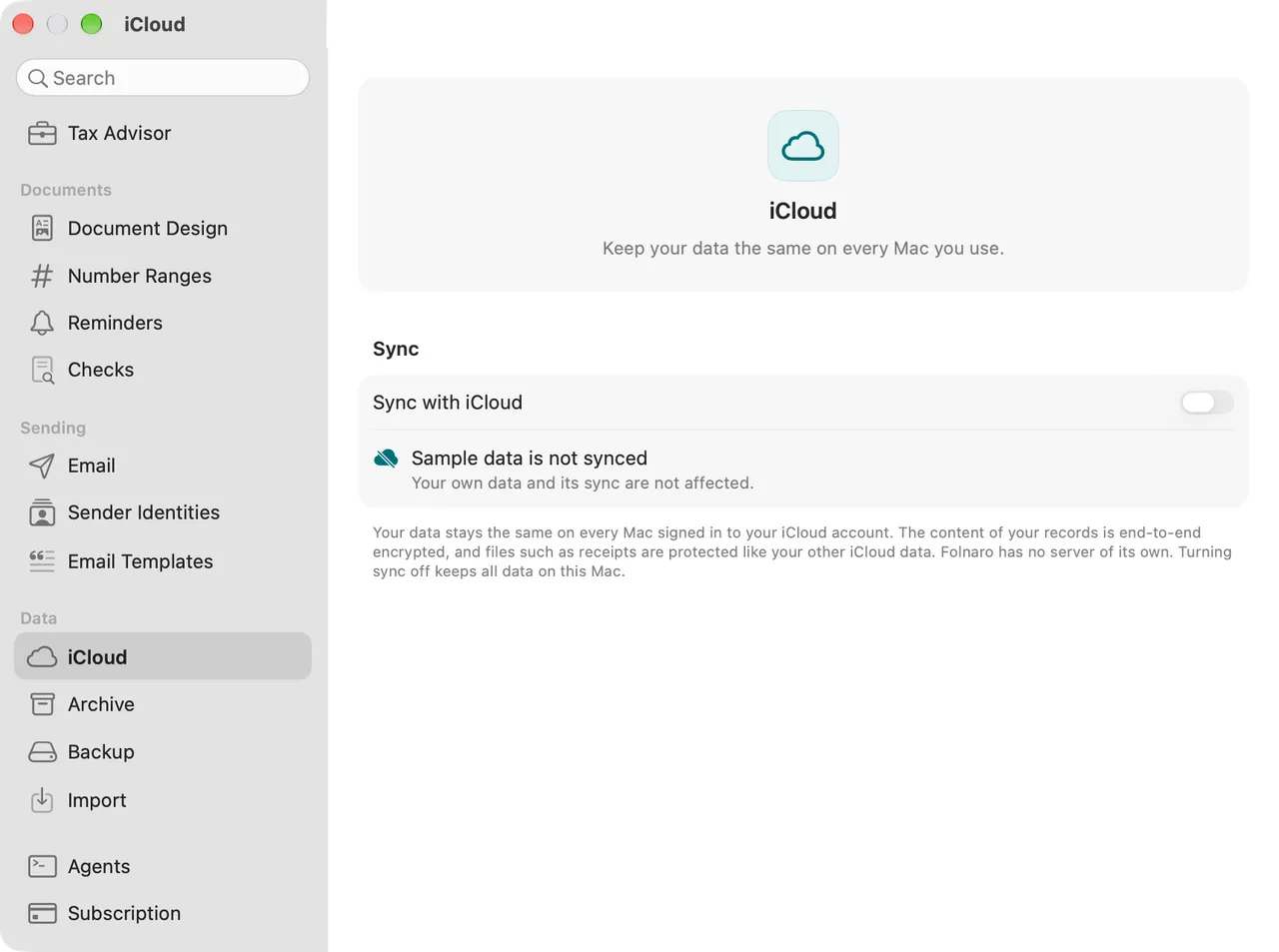
In sync across your Macs if you like, through your own iCloud. You can turn it off in Settings.
Backups
Automatic, to a place you choose, with a verified restore.
Always exportable
PDF, DATEV, XRechnung and the tax advisor package, even without a subscription.
iCloud sync settings showing the status synced.

Twelve areas, one app.

Every area has its own page with every step and captures from the app.

All features

No subscription needed

Buy once or subscribe. The same features.

Folnaro comes as a one-time purchase and as a subscription. Both unlock exactly the same, with no tiers and no add-ons. You try it free for 30 days first.

One-time purchase

Buy once, keep using it

€199.99 once

No subscription, no running costs.

  • Every Folnaro feature
  • Yours for good on your Apple Account
  • Shareable with Family Sharing

Subscription

Monthly or yearly

€7.99 a month

or €79.99 a year

  • Every Folnaro feature
  • Cancel any time in your Apple Account
  • Shareable with Family Sharing
Free for 30 days, no account and no payment details.Prices include VAT, purchase through the Mac App Store. All pricing details

Your data stays yours, even without a subscription.

Receipts must be kept for 8 years and books for 10. So everything stays accessible after the trial or when a subscription ends. Only creating and finalizing new documents, expenses and time entries needs a purchase or a subscription.

  • View, search and print everything
  • Export PDF, DATEV and XRechnung
  • Create the tax advisor package
  • Create and restore backups
  • Cancel a wrong invoice
  • Agents keep read access through MCP

No subscription

Buy once. No subscription running along.

Subscription or one-time purchase, both unlock every feature. If you would rather not have running costs, pay once.

From month 26 the monthly subscription would have cost more than the one-time purchase.

Pricing in detail

One-time purchase, €199.99 once Monthly subscription, added up

Switching

Switch in an afternoon.

Customers, products and invoices come along from SumUp Invoices, Lexware Office or sevDesk. Before saving, Folnaro shows a preview and reconciles the totals, and your number series continue without gaps.
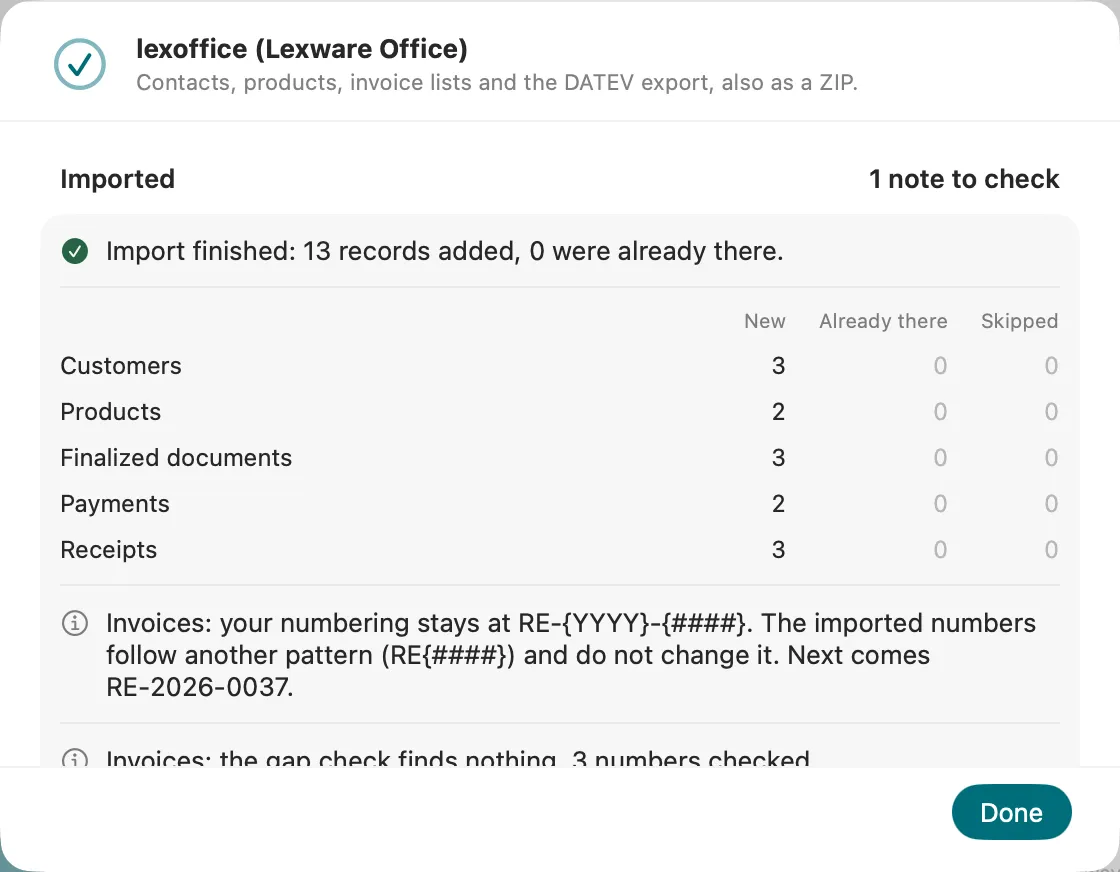
Import assistant after moving from lexoffice: imported customers, items and invoices.

Clear at a glance.

Download Folnaro and use every feature for 30 days. No account and no payment details.

Coming soon to the Mac App Store All pricing details