

Subscription, trial and what always stays
You can use Folnaro free for 30 days, without payment details. After that, a subscription or a one-time purchase unlocks new documents, expenses and time entries. Your data stays accessible either way: reading, searching, exporting and backups never need a subscription.
The trial
- The trial lasts 30 days from your first download of Folnaro from the App Store. It keeps running if you delete and reinstall Folnaro.
- It needs no account and no payment details, and every feature is unlocked. The subscription has no second trial.
- Trial ends in Folnaro > Settings… > Subscription shows the date and how many days are left, for example 12 days left.
- Nothing is charged when the trial ends. Folnaro simply stops creating new records until you choose an option.
Choose a subscription or the one-time purchase
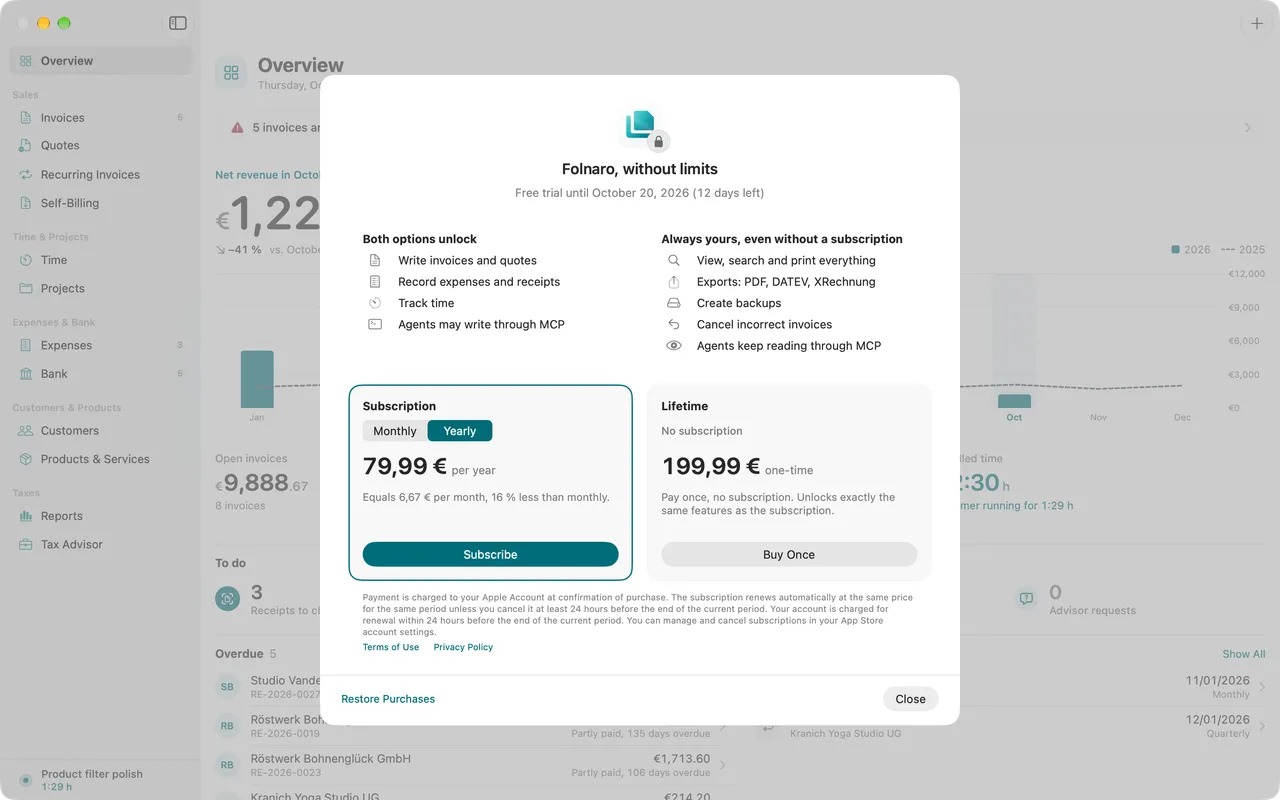
Both options unlock exactly the same: write quotes, invoices and corrections, record expenses and receipts, track time, and let agents write through MCP. The options window shows them side by side.
- Choose Folnaro > Folnaro Pro…, or choose Folnaro > Settings… > Subscription and click Show Options.
- For the Subscription, choose Monthly or Yearly under Billing period and click Subscribe. You can cancel anytime in the App Store.
- For Lifetime, click Buy Once. You pay once, with no subscription, and unlock exactly the same features as the subscription.
- Confirm the purchase with your Apple Account. Folnaro shows Folnaro is unlocked once the App Store confirms.
Prices
In Germany the subscription costs 7.99 € per month or 79.99 € per year, the one-time purchase 199.99 €. At launch the one-time purchase is available for a while at a lower price. The binding price is the one the options window shows: it comes straight from the App Store in your local currency and can differ by country.
Family Sharing
The subscription and the one-time purchase can be shared with your family through Family Sharing. If a family member’s purchase needs approval through Ask to Buy, Folnaro shows The purchase is waiting for approval, for example through Ask to Buy. until it is approved.
What always stays, even without a subscription
Your records stay accessible after the trial, after a lapsed subscription and even after a refunded purchase:
- View, search and print everything
- Exports: PDF, DATEV, tax advisor package, XRechnung
- Create and restore backups
- Sync with iCloud
- Record payments, reconcile the bank and cancel incorrect invoices
- Agents keep reading and exporting through MCP
What is locked without a subscription
Creating and finalizing new records needs a subscription or the one-time purchase. That covers quotes, invoices, self-billing invoices, recording expenses, recording time, starting the timer, billing time and importing data. If you try one of these, Folnaro opens the options and tells you what you were about to do, for example “You were about to create an invoice.”
In Folnaro > Settings… > Subscription, New documents shows Allowed or Locked, and Plan shows Read only while nothing is unlocked.
Restore purchases
On a new Mac or after reinstalling, bring back earlier purchases of your Apple Account.
- Choose Folnaro > Settings… > Subscription.
- Next to Purchases from this Apple Account, click Restore Purchases.
If the App Store finds your purchases, Folnaro is unlocked again right away. If Folnaro reports “No purchases were found for this Apple Account.”, check in System Settings that you are signed in with the Apple Account you bought with.
Change or cancel the subscription
- Choose Folnaro > Settings… > Subscription.
- Click Manage Subscriptions. In the App Store you cancel or change the period.
After canceling, your subscription runs until the end of the period you paid for. Access then shows Ends on with the date. To switch to the one-time purchase, buy it in the options window under One-time purchase instead of a subscription and then cancel the subscription yourself in the App Store.
If a subscription is still running next to a one-time purchase, Folnaro points it out. You can then cancel the subscription under Manage Subscriptions.
When a payment fails
If a renewal fails, you can keep working for up to 16 days while the App Store retries. Folnaro shows until when, for example Active until with a date. Check your payment details in the App Store in the meantime. If the payment does not go through, Folnaro switches to read only; nothing is lost.
Common problems
- The options window shows “The App Store cannot be reached”
- Check your internet connection and click Try Again. Prices load from the App Store.
- You bought Folnaro, but it still says Locked
- Click Restore Purchases under Folnaro > Settings… > Subscription. If that does not help, find more steps in Troubleshooting.
- The trial ended earlier than expected
- It counts from your first download, also an earlier one on this Apple Account. Choose an option for new documents, or keep using Folnaro read only.