

Connecting agents through MCP
Through MCP, agents can do what you do, under the same rules. Folnaro comes with its own MCP server. You decide in Settings what agents may change, and every change they make is in the audit log.
How it works
An agent is an assistant such as Claude or Codex that works in its own app. Connected to Folnaro, it can for example write a draft invoice from your notes, record the week’s time entries or check which invoices are overdue.
- The MCP server is inside the app at
Folnaro.app/. Your agent app starts it when needed. Folnaro does not have to be open.Contents/ MacOS/ folnaro-mcp - The server speaks MCP over stdio and needs no arguments. It works with the same database as the app, has no network access and needs no server on the internet.
- When an agent changes something, the Folnaro window updates right away.
Connect an agent
- Choose Folnaro > Settings… > Agents.
- Under Connect an agent, choose the app your agent runs in as Client: Claude Desktop, Claude Code, Codex, Cursor or Other MCP client. The snippet below adapts to it.
- For Claude Desktop, Codex and Cursor, click Write Configuration…. Folnaro suggests the usual configuration file and adds itself there. Other servers and settings in the file are kept, even if macOS asks whether to replace the file.
- Or click Copy and paste the snippet yourself.
- Restart the agent app.
Claude Desktop
The file is ~/. With Folnaro in the Applications folder, the entry looks like this:
{
  "mcpServers" : {
    "folnaro" : {
      "args" : [],
      "command" : "/Applications/Folnaro.app/Contents/MacOS/folnaro-mcp"
    }
  }
}
Restart Claude afterwards.
Claude Code
Run this command once in Terminal:
claude mcp add folnaro -- '/Applications/Folnaro.app/Contents/MacOS/folnaro-mcp'Codex
The entry goes into ~/. Restart Codex afterwards.
[mcp_servers.folnaro]
command = "/Applications/Folnaro.app/Contents/MacOS/folnaro-mcp"
args = []
Cursor and other clients
Cursor reads ~/ with the same structure as Claude Desktop and picks up the entry after a restart. Other apps only need the server path as the command, with no arguments.
FOLNARO_LANGUAGE (de or en).Decide what agents may do
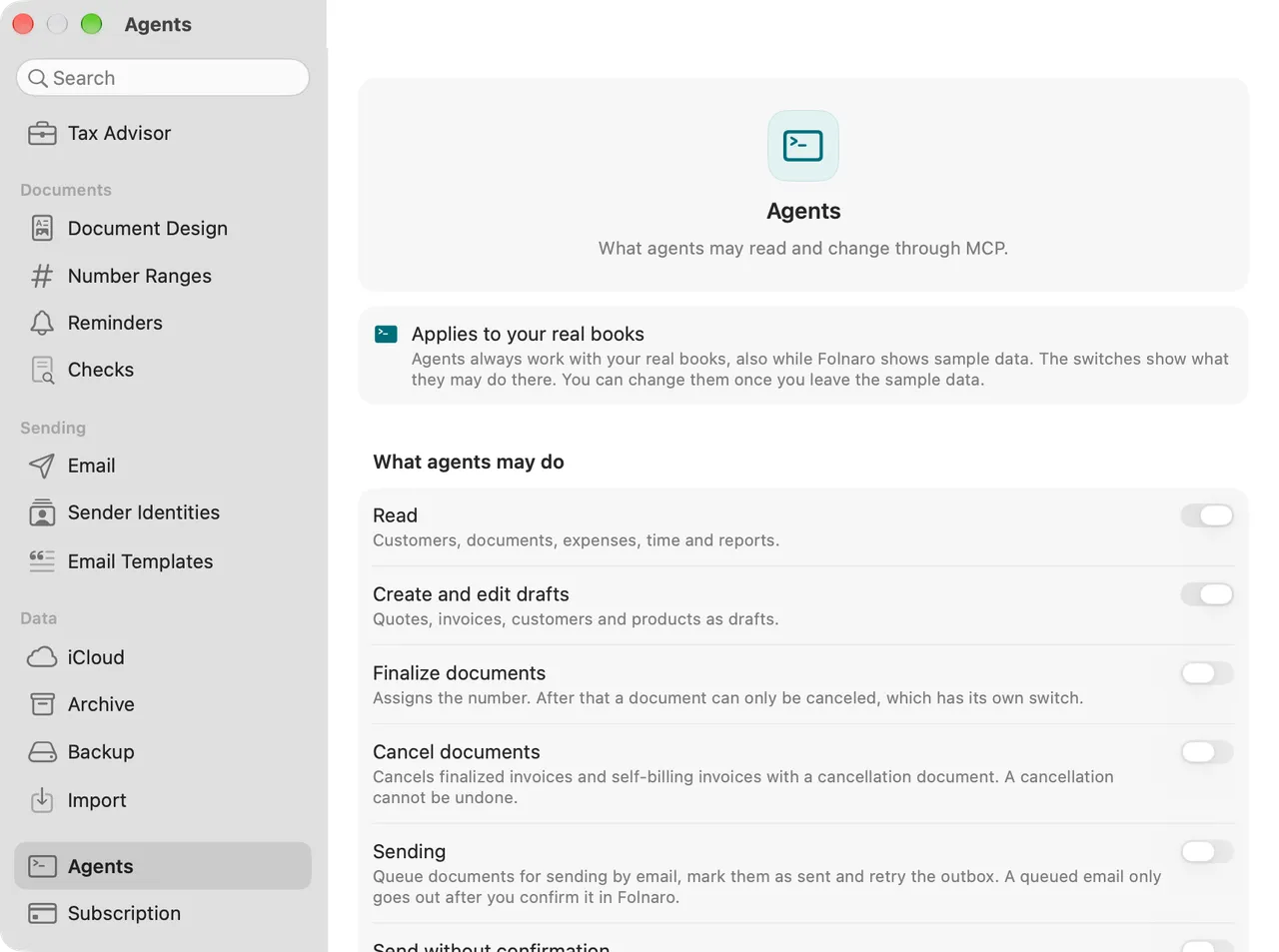
Under What agents may do, each capability has its own switch. At first only Read is on. When you turn on a capability that writes, Folnaro asks for Touch ID or your login password.
| Switch | What it allows |
|---|---|
| Read | Customers, documents, expenses, time and reports. |
| Create and edit drafts | Quotes, invoices, customers and products as drafts. This switch also covers merging duplicate customers. |
| Finalize documents | Assigns the number. After that a document can only be canceled, which has its own switch. |
| Cancel documents | Cancels finalized invoices and self-billing invoices with a cancellation document. A cancellation cannot be undone. |
| Sending | Queue documents for sending by email, mark them as sent and retry the outbox. A queued email only goes out after you confirm it in Folnaro. |
| Send without confirmation | Queued emails go to customers or the tax advisor at once. Agents may then also turn on automatic sending for recurring invoices. Only takes effect together with Sending. |
| Propose payments | Agents propose that an invoice was paid. It only counts as paid once you accept the proposal. |
| Bank transactions | Import bank statements and assign transactions to receipts. Matches with invoices become proposals. |
| Record expenses | Create expenses and attach receipts. |
| Track time | Create and change time entries. |
| Change settings | Business profile, tax numbers, reminder levels, filing deadlines and recurring invoice bundling. Never bank login, email password or these permissions. |
What Folnaro checks for you:
- An agent only sees the tools whose switch is on. If it tries something you have not allowed, it gets a message naming the switch you would have to turn on. It cannot turn it on itself.
- A change to a switch applies to the agent’s next request. You do not have to restart the agent app.
- The switches stay on this Mac. They are not part of iCloud sync, so on a second Mac you allow agents again.
The same rules as in the app
- Agents go through the same checks as you. A document with findings that need a reason can only be finalized once the agent gives a reason. The reason goes into the audit log.
- Numbers are assigned only when a document is finalized, exactly as in the app.
- Finalized documents stay unchangeable. An agent, too, corrects them only by cancellation.
Merging duplicate customers
When an agent creates or searches for a customer, Folnaro lists customers that look the same, for example with the same VAT ID, email or name. With Create and edit drafts turned on, the agent can merge them, just like Merge Customers… in the app:
- It first gets a preview of what would move, including how many finalized documents are affected.
- Documents, time entries, projects and expenses move to the remaining customer. Finalized documents keep their recipient, amounts and number.
- The duplicates are archived, never deleted. A merge can be undone once.
- The tools are
customers_merge(call it withdry_runfirst for the preview) andcustomers_merge_revertwith the merge id it returns.
Review payment proposals
Agents never mark an invoice as paid themselves. They propose payments and you decide.
- Choose Folnaro > Settings… > Agents. Under Payment proposals, Proposals from agents shows how many proposals are waiting.
- Click Review…. You can also press ⌘K and search for Review Payment Proposals.
- Click Accept on a proposal. Folnaro records the payment in your name; only then does the invoice count as paid.
- Or click Decline and optionally give a reason. Nothing is recorded, and the agent sees the reason.
Accepting and declining are recorded in the audit log. Decided proposals appear under Recently decided.
Without an active subscription
Without an active subscription or the one-time purchase, agents cannot create anything new, whatever is switched on. Settings shows Without an active subscription agents can only read, whatever is switched on here.
- Locked: new drafts, finalizing, time entries and timers, billing time, new expenses, new self-billing invoices and creating recurring invoices.
- Keeps working: reading and every export, canceling an incorrect invoice, payments and payment proposals, bank reconciliation, customers and products, editing existing drafts and stopping a running timer.
The agent gets a message that Folnaro is in read-only mode. More in Subscription, trial and what always stays.
What agents changed
Every change by an agent is recorded in the audit log, with the agent as author and the name of its app, for example claude-code. An agent can read the log of a record itself, so you can ask it what it changed. The log is part of every backup, and nobody can change its entries afterwards.
Common problems
- The agent does not find Folnaro
- Restart the agent app after writing the configuration. Check that the path in the configuration matches the one under MCP server. After moving Folnaro to another folder, write the configuration again.
- An entry still points to Contents/Helpers
- Earlier versions put the server there. Click Write Configuration… again or copy the new snippet. The entry is replaced and other entries are kept.
- “Configuration not written”
- The file is not valid JSON or could not be read. Folnaro leaves it unchanged. Fix the file or click Copy and paste the snippet by hand.
- The agent says a switch is off
- Turn on the switch it names under What agents may do. It applies to the agent’s next request.
- The agent cannot create anything although the switch is on
- Without an active subscription agents work read only. Check Folnaro > Settings… > Subscription.